Click Allow to get more information on Appmobs Services for free!









 Download The Latest Version
View Previous Versions
Download The Latest Version
View Previous Versions
Introduction and Review
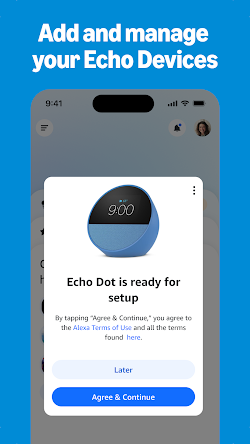
Amazon Alexa is a mobile app that allows users to connect, configure, and control devices enabled with Alexa and compatible smart-home devices. Instead of just being a voice assistant app, the app is actually a hub for all Echo speakers, smart lights, plugs, cameras, thermostats, entertainment systems and more connected items. This is so beneficial for homes that have already grown an Alexa-enabled smart-home infrastructure.
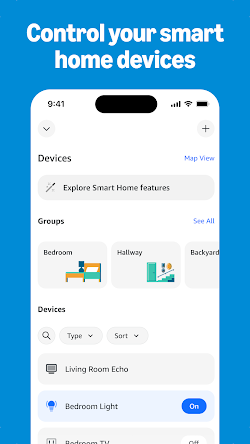
Smart home management is one of the best features of the application. Users can pair compatible devices, group them, access their status and control them with a smartphone. Alexa's smart-home line of products includes lights, switch, plugs, thermostat, cameras and door locks. This can be a helpful feature when talking directly to an Echo device isn't convenient to you. For example, users can open the app and manually adjust connected lights or check whether supported devices are switched on.
Routines make the experience considerably more powerful. With a single command, the user can execute several actions within a single routine, rather than having to use several commands. For instance, a morning routine can give a weather forecast, play music, and adjust devices which are compatible with the smart home. Voice and time triggers can activate the routines, as well as certain smart-home events. Amazon currently allows up to 200 routines on an account.
The app also gives Alexa access to its wider entertainment and information platform. Alexa may handle music, podcasts, news, weather, shopping lists, reminders, calendars and more common activities as the user's internet-connected services and devices vary. Music and audio service functionality are integrated into Amazon's Alexa platform, in addition to news and other Alexa skills, enabling consumers to add capabilities to Alexa's abilities.
Another advantage is device organization. With multiple Echo speakers and smart home accessories, users can control their setup from a single app instead of individually configuring each product. Groups and device controls can make commands more natural, while compatible devices can be organized according to rooms or other preferences.
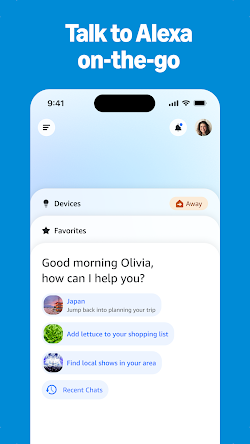
Alexa has also been getting more conversational with Alexa+, which Amazon states is a more natural assistant to help plan, schedule, make recommendations, and to offer assistance in everyday tasks. The Alexa ecosystem can maintain conversations across supported Echo and Fire TV devices, while the Alexa app provides mobile access to the experience.
In terms of usability, the sheer number of features can be a strength and a weakness. For a new user, the number of menus, devices, skills, routines and settings can appear daunting. But, when a household is set up, the app will serve as a valuable command centre in managing everyday smart-home use.
In sum, Amazon Alexa is ideal for Alexa-enabled smart home devices owners as well as those owning Amazon Echo devices. It offers more functionality than an ordinary remote-control app — with device management, automation, a multimedia player, reminders and voice-assistance.
Updates
The new edition has been reworked to provide an improved user experience that makes Alexa easier to use and more reliable. The Home page now provides quicker access to smart-home controls, Echo management, and popular Alexa features. The new Devices page features custom views to arrange and control usually related devices depending on personal favorite.




 Get it From Google Play

 Get it From App Store
Download The Latest Version
View Previous Versions
Get it From App Store
Download The Latest Version
View Previous Versions
Similar to This App





ratings